

You can get a private, instant AI score on any profile photo right now. Upload to DoubleMyMatches, read your one-line verdict, and follow the short checklist below. No guessing, no waiting for a friend's opinion.
Here is what to do straight away:
- Upload your top three photos and let the AI rank them best to worst.
- Read the category scores, not just the headline number. Expression and lighting matter most for dating apps.
- Pick your lead photo based on the platform: Tinder rewards approachability; Hinge rewards personality; Bumble rewards warmth.
- Re-shoot or edit anything that scores below 6/10 in lighting or expression before posting.
Your photos are analysed once and then discarded. DoubleMyMatches is GDPR-compliant and does not use your images to train its models or share them with third parties.
Pro Tip: Upload the photo you currently use as your lead shot first. That single comparison tells you immediately whether you are leading with your strongest image.
Key takeaways
AI photo scoring gives you an objective, private verdict on your dating profile pictures in seconds, with lighting and expression consistently being the factors that move scores most.
| Point | Details |
|---|---|
| Upload your lead photo first | Your current profile photo is the fastest baseline; compare it against two or three alternatives immediately. |
| Read category scores, not just the headline | Expression and lighting scores predict dating performance better than the overall number alone. |
| Fix lighting and expression before anything else | These two factors move dating-photo scores most reliably; reshoot near a window before editing. |
| Use one-off analysis for privacy | DoubleMyMatches discards images after scoring and does not use them for model training. |
| DoubleMyMatches ranks your full lineup | Upload multiple photos for a best-to-worst order with platform-specific advice for Tinder, Hinge, and Bumble. |
Table of Contents
- How does an AI photo rater actually analyse your images?
- What does the AI check when you rate a picture?
- What does a sample AI report look like?
- How do you improve a low score after getting photo feedback?
- Which photos should you rate first?
- What happens to your photo after you upload it?
- Free vs paid: what do you actually get?
- Why DoubleMyMatches is the recommended choice for dating photo ratings
- Using your rated photos directly on dating and social platforms
- The honest case for objective photo testing
- Get your dating photos rated privately, right now
- Sources
How does an AI photo rater actually analyse your images?
The engine behind any credible photo rating site uses convolutional neural networks (CNNs), a class of model that reads images the way a human eye scans a scene: edges first, then textures, then higher-level shapes like a face or a background object. CNNs extract spatial features from pixel data, which feed classifiers that produce the category scores you see in your report.
Those classifiers combine several signals at once: face visibility, lighting direction, expression, background complexity, crop tightness, and sharpness. Each signal gets a weighted contribution to the overall score, with the weights tuned for the specific use case. A dating-photo model weights expression and face clarity heavily. A headshot model weights neutral background and professional framing instead.
The report you receive shows category scores alongside region highlights, small overlays on the image that show exactly which area the model flagged. That transparency matters because a single headline number can mislead. A photo might score 7.2/10 overall while carrying a 4/10 expression score, which is the detail that actually costs you right-swipes.
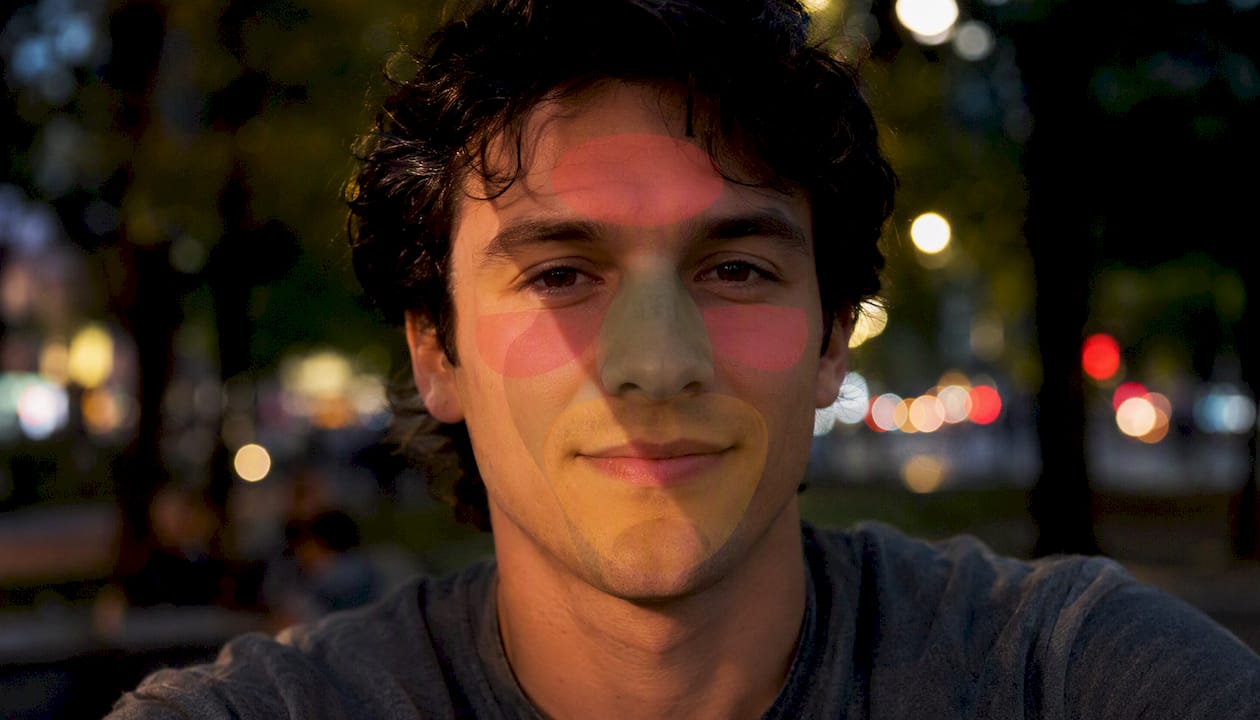
Limitations are real. Models trained on certain demographic groups can underweight features common in other groups. Cultural norms around eye contact and smile width vary. Platform-aware recommendations help correct for intent differences (dating versus LinkedIn), but no model is perfectly neutral. Treat the score as a strong signal, not a verdict.
Pro Tip: When your technical score (lighting, sharpness) is high but your expression score is low, fix the expression first. Technical polish does not compensate for a closed-off or tense face in a dating context.
What does the AI check when you rate a picture?
AI photo critique tools inspect a consistent set of factors. Here is what moves your score, and in which direction.
Factors that raise your score:
- Face visibility: Clear, unobstructed face at thumbnail size. Sunglasses, heavy shadows, and group shots all reduce this score.
- Eye contact: Looking directly at the camera reads as confident and approachable on dating apps.
- Expression: A relaxed, genuine smile scores higher than a forced grin or a neutral stare for dating photos.
- Lighting quality: Soft, even light from the front or at a 45-degree angle. Harsh overhead light creates unflattering shadows across the eyes.
- Composition and crop: Subject centred or placed on the rule-of-thirds line, with appropriate headroom and a mid-distance crop that shows face and shoulders clearly.
- Background calm: A simple, uncluttered background keeps the focus on you. Busy backgrounds compete for attention.
- Technical quality: Sharp focus on the eyes, low noise, no heavy compression artefacts.
Factors that lower your score:
- Sunglasses or hats that obscure the face.
- Harsh shadows falling across the eyes or chin.
- Extreme filters that flatten skin texture or shift colour unnaturally.
- Tight crops that cut off the top of the head or feel claustrophobic.
- Cluttered backgrounds with text, other people, or bright competing objects.
- Blurred or pixelated images from heavy compression.
As Pokecut notes, the AI rates the photo's presentation for a given platform rather than evaluating you as a person. That framing is worth keeping in mind when you read your score.
What does a sample AI report look like?
A typical report from a photo feedback tool presents an overall score alongside three to five category scores. Here is a realistic example:
| Category | Score (out of 10) | What it means |
|---|---|---|
| Overall | 6.7 | Solid but not leading with your best shot |
| Lighting | 6.7 | Good direction; slight colour cast on the left side |
| Expression | 5.0 | Smile reads as tense; eyes not fully engaged |
| Composition | 7.5 | Good crop and headroom |
| Background | 6.5 | Slightly busy; one competing element behind left shoulder |
| Sharpness | 7.5 | Eyes in focus; no compression artefacts |
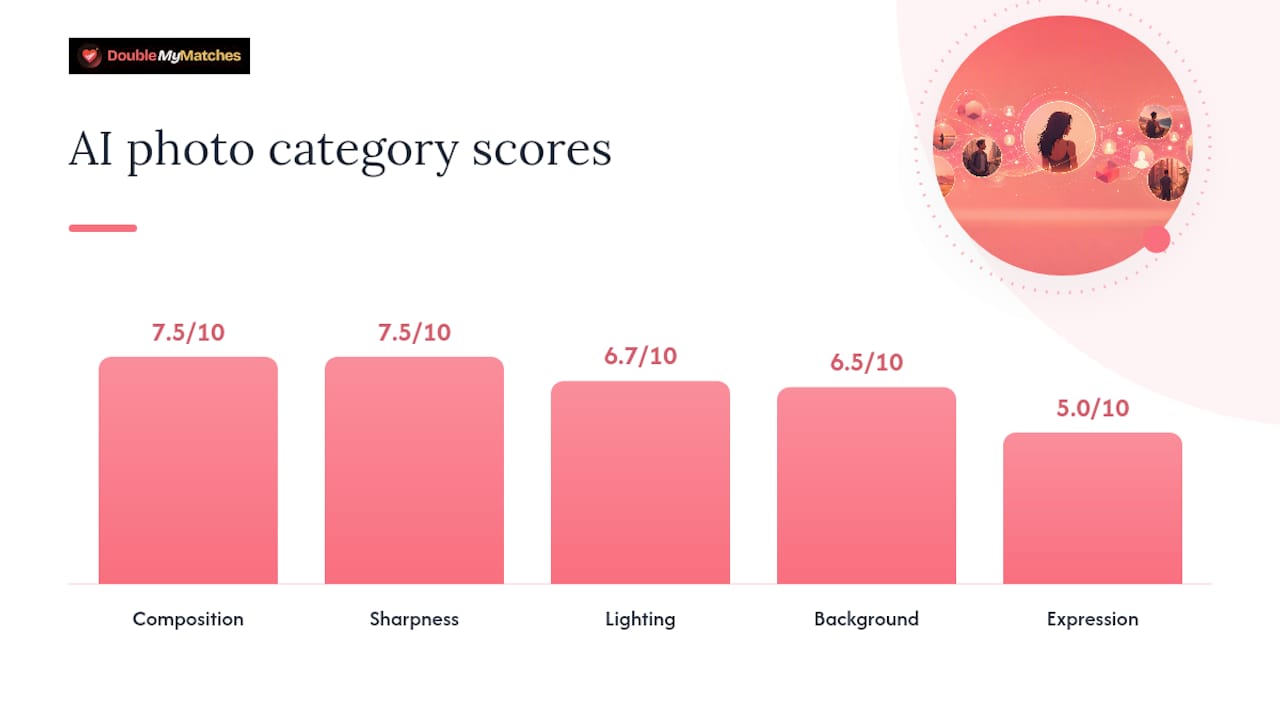
The region highlight for this photo would flag the shadow falling across the left eye and the object behind the shoulder. PhotoMentor's visual overlays work this way, marking the exact pixel region the model flagged so you know precisely what to fix.
When two photos have close overall scores (say, 6.7 and 6.9), read the category deltas instead of the headline. A photo with a 5.0 expression score will underperform a 6.7 overall photo with a 7.5 expression score on a dating app, because expression drives first-impression decisions faster than any other factor.
How do you improve a low score after getting photo feedback?
Work through fixes in order of score impact. Lighting and expression move scores most reliably for dating photos, so start there.
Reshoot checklist:
- Face the camera directly and shoot at eye level or slightly above.
- Stand near a large window or in open shade for soft, even light.
- Relax your jaw, take a breath, and let the smile reach your eyes before the shutter fires.
- Keep the background simple: a plain wall, greenery, or an uncluttered outdoor setting.
- Shoot in portrait orientation for a mid-distance crop that shows face and shoulders.
Quick editing checklist:
- Lift exposure slightly if the face looks dark.
- Apply selective sharpening to the eyes only, not the whole image.
- Add a subtle background blur if the setting is busy.
- Correct any colour cast to neutral skin tones.
- Remove heavy filters entirely.
Re-test workflow: edit one thing, re-upload, compare the new score against the original. PixMentor's approach of giving one focused improvement tip per image works well here: act on one change, re-rate, then decide whether to move to the next fix or reshoot. ShutterCoach's batch culling shows how professional tools handle multiple images at once, which is useful when you have a large set to narrow down.
Pro Tip: The single edit that moves dating-photo scores most reliably is fixing the light on your face. Move to a window, reshoot, and re-rate before touching anything else.
Which photos should you rate first?
The right answer depends on what the photo needs to do. Platform-aware guidance matters here because "best photo" means something different on Tinder versus LinkedIn.
- Dating lead photo: Prioritise approachability, a clear face, and a mid-distance crop. Candid energy scores better than a stiff posed shot. Rate this one first.
- Supporting dating shots: Activity photos, full-body shots, and social-proof images have lower face-detail requirements but still need clarity and a calm background. Rate these second.
- LinkedIn headshot: Tighter crop, neutral background, professional expression. The AI will weight neutral expression and wardrobe appropriateness more heavily here.
- Social avatars: Recognisability at small sizes matters most. A photo that reads clearly at 40×40 pixels is the goal. Check your score at thumbnail size, not full resolution.
When you have many options, start with whichever photo you currently use as your lead shot. That gives you an immediate baseline. Then rate your next two or three candidates and compare. The dating photo selection guide walks through the full lineup-building process if you want a structured approach.
What happens to your photo after you upload it?
DoubleMyMatches analyses your image once and then discards it. Your photos are not stored long-term, not published, and not used to train the AI model. That is a firm policy, not a footnote.
Key data-handling facts:
- One-off analysis: The image is processed, scored, and removed. No account required for a single check.
- No training use: Your photos never feed back into the model. The analysis is a one-way process.
- GDPR rights: As a UK user, you have the right to access, correct, or request deletion of any personal data held. DoubleMyMatches's privacy policy sets out how to exercise those rights.
- Account-based flow: If you create an account to save your score history, your images are held only for the duration of your session or until you delete them.
Free photo rating tools vary widely on retention policies. Some store images indefinitely; others use them for model training. Always check the privacy policy before uploading a photo you would not want shared.
Practical tip: For sensitive photos (anything you would not post publicly), use the one-off analysis option. No account, no history, no retained image.
Free vs paid: what do you actually get?
The free single-photo check gives you an overall score and a brief summary of the main issue. That is enough to know whether a photo is worth keeping or needs a reshoot.
Paid reports add considerably more:
- Multi-photo lineup: Upload several images and receive a best-to-worst ranking with per-photo scores.
- Deep category breakdowns: Scores for lighting, expression, composition, background, and sharpness individually.
- Visual region highlights: Overlays showing exactly which part of the image the AI flagged.
- Platform-specific advice: Separate recommendations for Tinder, Hinge, and Bumble based on each app's audience and algorithm tendencies.
- Personalised lineup order: The AI recommends which photo to use as your lead shot on each platform.
Pricing follows three shapes: a one-off report (best for a quick audit), a bundle (best if you plan to reshoot and re-test two or three times), and an unlimited annual pass (best for frequent daters who update their profile regularly). The tools overview lists current options.
How to decide: If you have more than three photos to evaluate and want platform-specific recommendations, a paid report pays for itself in saved guesswork. If you just want to confirm one photo is usable, the free check is sufficient.
Why DoubleMyMatches is the recommended choice for dating photo ratings
DoubleMyMatches is built specifically for dating app users, which changes what the scoring model prioritises and what the report tells you.
- Instant scoring for dating apps: Results arrive in seconds, not hours. No waiting for community votes.
- Platform-aware recommendations: Separate guidance for Tinder, Hinge, and Bumble, because what works on one does not always transfer.
- Privacy-first one-off analysis: Images are discarded after scoring. No account required for a single check.
- Best-to-worst lineup ordering: Upload multiple photos and receive a ranked order, not just individual scores.
- Weak-photo identification: The report flags photos that actively harm your profile, not just ones that could be better.
The photo quality guide explains which specific traits drive match rates, if you want the evidence behind the scoring model.
Pro Tip: After you receive your ranked lineup, use the top-scoring photo as your Tinder lead, then test the second-ranked image as your Hinge lead. Different audiences respond differently, and a two-week split test tells you more than any single score.
Using your rated photos directly on dating and social platforms
Once you have your ranked lineup, moving the best photo into your dating app profile is straightforward. On Tinder, Hinge, and Bumble, you can reorder photos directly within the app's profile editor without re-uploading from scratch if the image is already in your camera roll.
For social platforms, the same scored image works as a profile picture on Instagram or LinkedIn, though you may want to crop differently for each. LinkedIn favours a tighter headshot crop; Instagram allows a slightly wider frame. The profile picture tester lets you check how a photo reads at the small avatar sizes these platforms use before you commit.
One practical step: save your top three rated photos to a dedicated folder on your phone. When a platform prompts you to update your profile picture, you always have your best options ready without scrolling through hundreds of images.
The honest case for objective photo testing
Asking friends whether a photo looks good is a reasonable instinct, but it produces unreliable results. Friends soften feedback, share your aesthetic blind spots, and have no reference point for what performs well on a dating app specifically. The result is usually "that one looks nice," which tells you nothing useful.
Objective scoring removes that social friction. You get a number, a category breakdown, and a specific fix. That is a much shorter path from "I think this photo is fine" to "I know this photo is my strongest opener." The psychology behind photo selection explains why we are reliably poor judges of our own images.
One caveat: do not over-index on a single score. A photo that scores 7.8/10 but feels completely unlike you will underperform a 6.5/10 photo that shows your actual personality. Use the AI score to eliminate clear weak spots, then apply real-world feedback (match rate changes after a swap) to confirm the winner. Iterate. Edit, re-rate, compare. That loop is where the real improvement happens.
Get your dating photos rated privately, right now
Skip the guesswork. DoubleMyMatches gives you an instant, honest score on your dating photos, ranked from strongest to weakest, with specific fixes for lighting, expression, and crop. Your images are analysed once and deleted. No account needed for a single check.
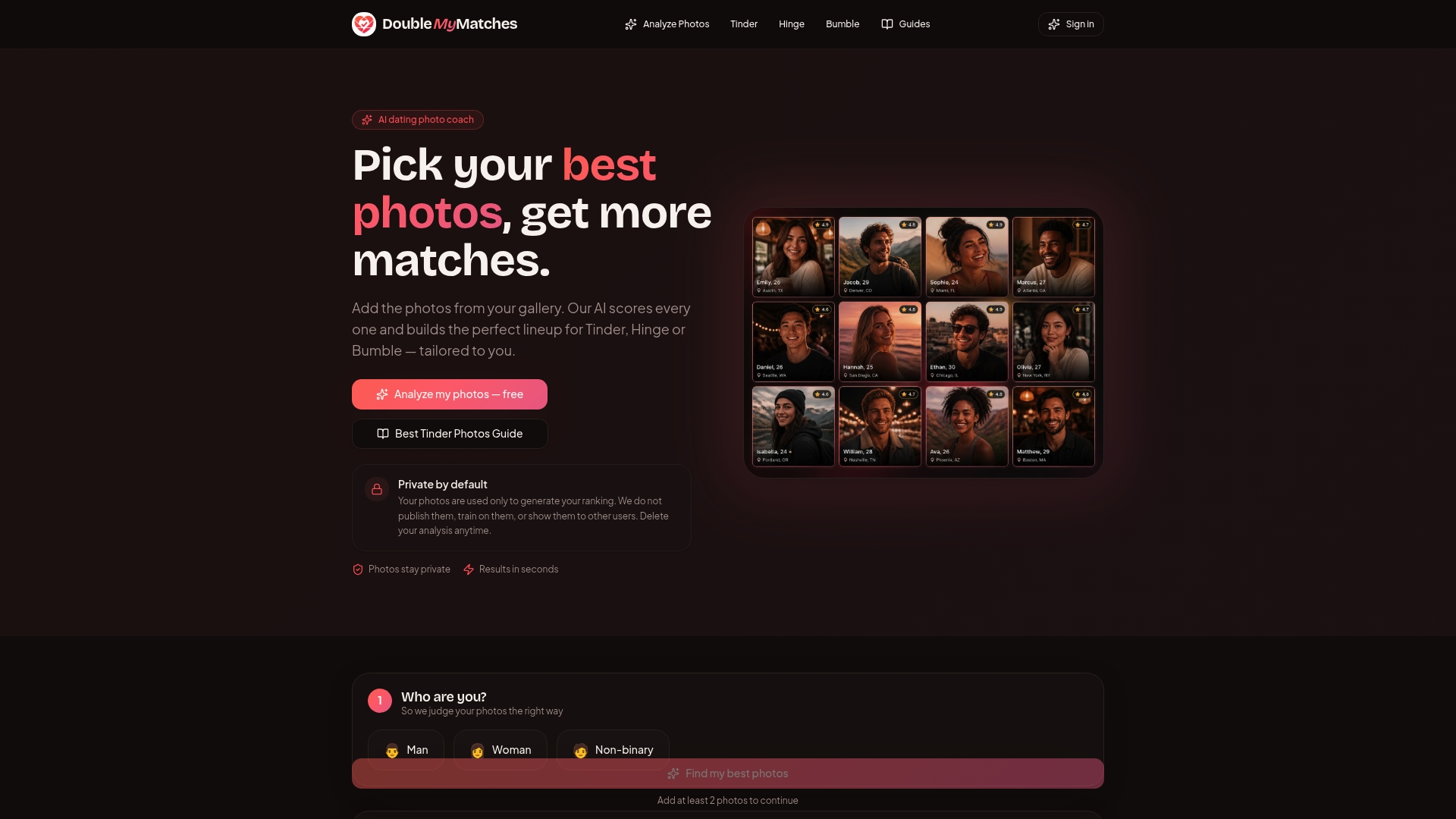
Start with the free single-photo evaluation to see your overall score and the one change most likely to increase your right-swipes. If you want a full lineup ranking with platform-specific advice for Tinder, Hinge, or Bumble, the paid report gives you everything in one place. Upload your photos, read your results, and post your best shot with confidence.
Sources
The sources below are worth bookmarking if you want to go deeper on AI photo analysis, scoring methodology, or practical profile improvement.
- Rate My Photo Online Free With AI | Pokecut
- PhotoMentor
- AI Photo Critique — PixMentor
- ShutterCoach - Instant Photo Feedback
- Convolutional neural network — Wikipedia