
Tinder Smart Photos automatically tests and reorders your profile pictures based on how people swipe. Used correctly, it can raise your match rate; used as a substitute for good photos, it won't do much at all.
Tinder's own testing found members using Smart Photos saw up to a 12% increase in matches. That's a genuinely useful bump, but it's a ceiling, not a guarantee.
Here's the quick verdict:
- Turn it on if: you already have 4 to 6 varied, high-quality photos.
- Fix your photos first if: most of your shots are blurry, outdated, or all look the same.
- Don't expect it to: turn a weak photo set into a strong one.
Key Takeaways
Smart Photos improves match rates by continuously testing photo order, but its 12% upside only appears when your underlying photos are already strong.
| Point | Details |
|---|---|
| Core mechanism | Smart Photos uses multi-armed bandit testing to reorder photos based on swipe data, not a single fixed test. |
| Headline result | Tinder's own testing found up to a 12% increase in matches once ordering settled. |
| Biggest limitation | The algorithm can't upgrade poor-quality photos; it can only reorder what you give it. |
| Monitoring window | Give the toggle at least one to two weeks before judging match-rate changes. |
| Recommended prep step | Use an AI photo ranking tool like DoubleMyMatches to fix your photo set before relying on Smart Photos to sort it. |
Table of Contents
- What is Tinder smart photos and how does it decide your order?
- Does smart photos actually work on tinder?
- How do you turn smart photos on or off?
- What photos should you upload before enabling smart photos?
- Where smart photos falls short, and what data it uses
- Should you A/B test manually, ask friends, or use an AI photo coach?
- Fix the photos, then trust the algorithm
- Get your photos match-ready before you flip the toggle
- Sources
- FAQ
What is Tinder smart photos and how does it decide your order?
Smart Photos doesn't run a single test and declare a winner. It runs continuous testing, swapping which photo appears first, watching how people respond, and adjusting on the fly. Tinder's own description confirms this: the feature alternates the photo shown first, records swipe responses, and reorders your line-up based on what performs best.
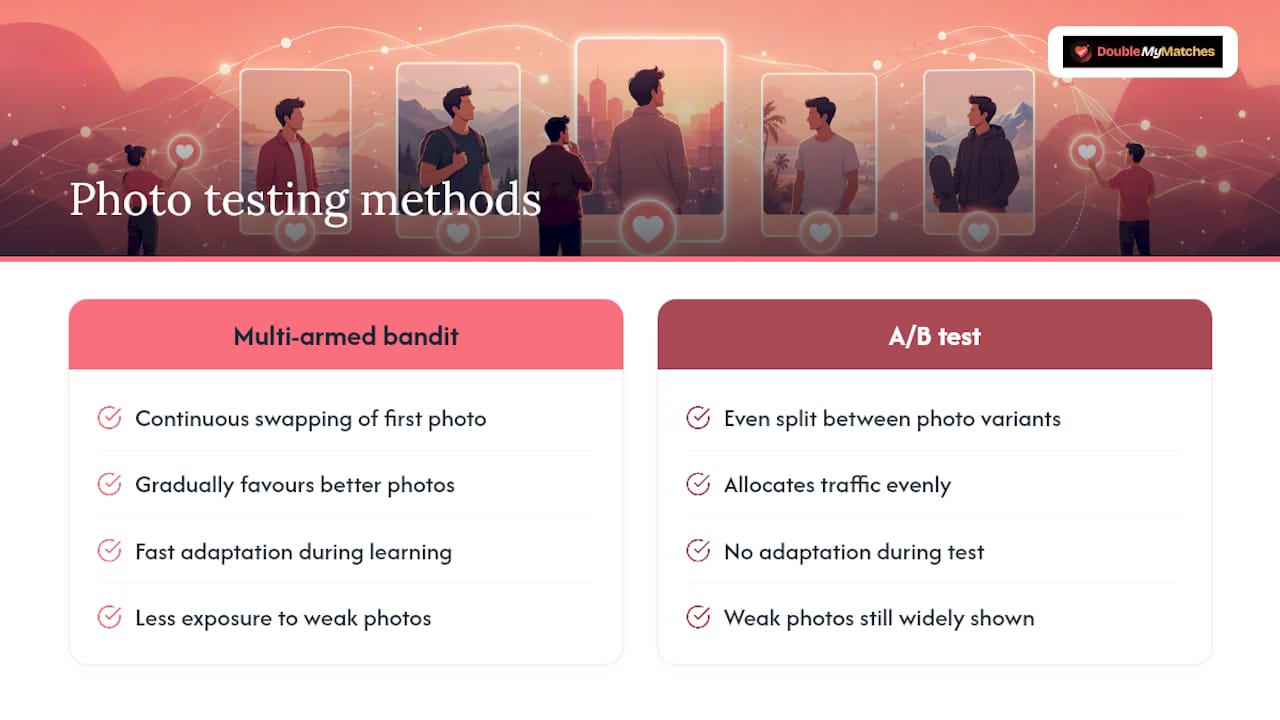
The method behind this is called multi-armed bandit testing. Picture a row of slot machines: you don't know which pays out best, so you try each one, then gradually favour the ones that pay more. That's the exploration versus exploitation trade-off. WIRED explains that this balance means fewer people get shown your weakest photo while the system is still learning, unlike a blunt A/B test that splits traffic evenly regardless of early results.
More recently, Tinder's engineering team moved to Vision-Language Models, comparing photos in pairs rather than scoring them in isolation, which improved ranking accuracy over earlier approaches.
Pro Tip: Photos that look genuinely different from each other (a close-up, a full-body shot, an action shot) give the algorithm clearer signals than five near-identical selfies. Variety speeds up learning.
Does smart photos actually work on tinder?
Yes, within limits. The headline figure is Tinder's own: members in early testing saw matches rise by up to 12% once Smart Photos found the strongest photo order. That's the number worth remembering, though it came from Tinder's own test conditions and won't apply evenly to every profile.

Independent tech coverage backs the mechanism without inflating the promise. TechCrunch reported that the feature reflects Tinder's large-scale data approach rather than any perfect judgement of who's attractive. It's pattern matching at scale, not a beauty panel.
What actually shifts the odds in your favour:
- Strong baseline photos, average results become good: the algorithm has real quality to sort.
- Weak baseline photos, minimal lift: reordering five mediocre shots still leaves you with five mediocre shots.
- Larger photo sets learn faster: more candidates give the system more comparisons to work from.
How do you turn smart photos on or off?
- Open your Tinder profile and tap Edit Info.
- Scroll to the photos section and find the Smart Photos toggle.
- Switch it on to let Tinder start testing your order, or off to lock your current arrangement.
- Leave it running for at least one to two weeks before judging results, since swipe volume needs time to build a reliable signal.
Pro Tip: Track matches weekly, not daily. A single bad day (or a great one) is noise. Look at the trend over several weeks before deciding Smart Photos helped, hurt, or made no difference.
What photos should you upload before enabling smart photos?
Smart Photos ranks what you give it. It cannot invent a good photo out of a bad one, which is exactly why Business Insider's coverage of the launch notes that swipe signals are noisy and can't compensate for fundamentally poor source material.
A solid set to upload before flipping the toggle:
- One clear, smiling face shot (no sunglasses, no group shot as your opener).
- One full-body photo so matches know what they're getting.
- One social or action shot (travel, sport, a night out) that shows personality.
- One hobby or props photo that gives people something to message you about.
- Optionally, one shot with friends or a pet, cropped so you're clearly identifiable.
Avoid heavy filters, dim lighting, and photos where someone else could easily be mistaken for the subject. Skip anything older than a year or two.
Pro Tip: Before you upload, do three things on your phone: crop out clutter, nudge the brightness up if the shot's dim, and strip any filter that changes your skin tone. These thirty-second fixes often matter more than which app you use to take the photo.
Where smart photos falls short, and what data it uses
Smart Photos has real limits. It can't upgrade a low-quality photo, it relies on swipe data that's inherently noisy, and preferences vary by who's viewing your profile, so Tinder's ranking system can personalise ordering in ways that aren't visible to you.
To run the feature, Tinder uses your swipe interactions, how often each photo gets shown, and, if you've linked it, your Instagram photos. Check your app's privacy settings if you want to review what's connected.
If matches dip in the first week, don't panic. Small sample sizes produce swings that smooth out over time.
Should you A/B test manually, ask friends, or use an AI photo coach?
You've got three routes: reorder photos yourself and watch what happens, ask friends for blunt feedback, or run an objective AI analysis before you touch the toggle. Manual testing gives you full control but takes weeks of patience and vague signals. Friends are quick but rarely honest about a bad angle or an ill-fitting shirt.
An AI Tinder photo analyzer solves the honesty problem: it scores lighting, expression, and composition objectively, before you ever rely on Tinder's swipe data to sort things out.
- Manual route: rotate your lead photo weekly, log matches, repeat for a month.
- AI route: get your photos ranked in minutes, upload the strongest set, then let Smart Photos fine-tune the order from there.
Pro Tip: Use the AI route to pick your best photos, then use Smart Photos to optimise their order. The two aren't competitors, they're sequential steps.
Fix the photos, then trust the algorithm
Smart Photos rewards good input and can't rescue poor input. Most profiles that "don't work" have a photo problem Tinder's toggle was never built to solve.
Pro Tip: Run a small experiment: fix your worst photo, enable Smart Photos, and check your match count after two weeks against the two weeks before.
Measure before you judge. Guessing gets you nowhere; a fortnight of real data does.
Get your photos match-ready before you flip the toggle
DoubleMyMatches gets your photo set right before Tinder's algorithm ever touches it, which is the step most people skip. Rather than guessing which shot looks strongest, our AI dating photo analyzer scores every photo you upload for lighting, expression, and composition, then tells you exactly which ones to lead with.

Three things it does that matter here:
- Objective ranking: no friend's polite opinion, just a score based on what actually reads well on dating apps.
- Instant feedback: you get results in minutes, not weeks of manual testing.
- Private, one-time analysis: your photos are reviewed and then discarded. Nothing gets published or used to train the AI.
Sort your best-to-worst line-up with DoubleMyMatches, upload that set to Tinder, then switch on Smart Photos to let it refine the running order from there.
Sources
- Introducing Smart Photos - For The Most Swipeworthy You — Tinder pressroom
- How Tinder® uses AI to rank profile photos — Life at Tinder
- Tinder’s new Smart Photos show just how well the app knows you — TechCrunch
- Tinder taps its inner Vegas to predict swipe rights — WIRED
FAQ
Does Smart Photos work on Tinder for everyone? It works best when you already have several strong, varied photos for the algorithm to test. Weak photo sets see little benefit regardless of how long the feature runs.
How long should I leave Smart Photos on before judging results? Give it at least one to two weeks so swipe volume has time to produce a reliable pattern rather than a one-day fluke.
Can I turn Smart Photos off if I don't like the reordering? Yes. Go to Edit Info in your Tinder profile and switch the Smart Photos toggle off at any time to lock your current order.
What's the best app to order photos before using Smart Photos? An objective AI photo analysis tool ranks your set by lighting, expression, and composition, so you upload your strongest options before letting Tinder's algorithm take over the fine-tuning.
Does Smart Photos use my Instagram photos? Only if you've linked your Instagram account to Tinder. Check your app's connected accounts settings to see what's currently linked.